


Intent – The Chat translator
4.048.00 Reviews
App Specs
- Version
- 0.5.7.1
- Updated On
- License
- Free
- Downloads
- 1,000,000+
- Developer
- Intent Inc.
- Categories
- Communication
- Platform
- Android
Screenshots

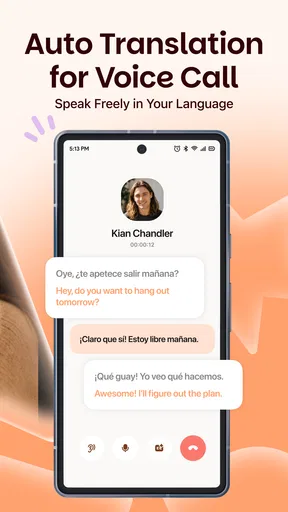
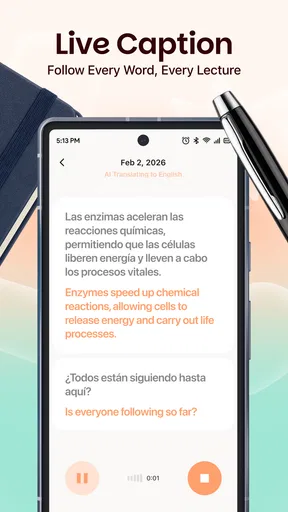
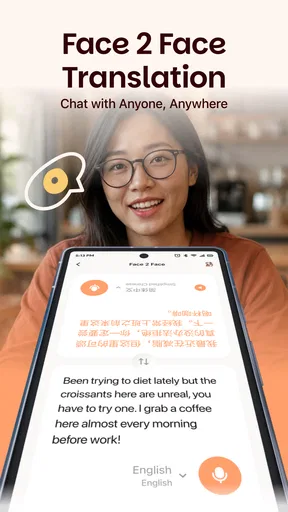
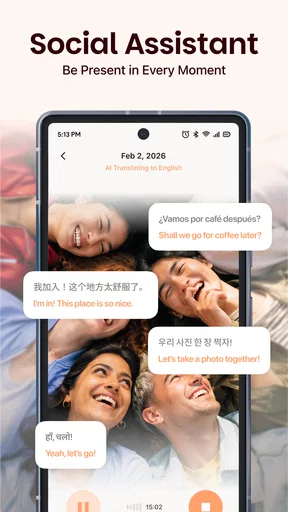
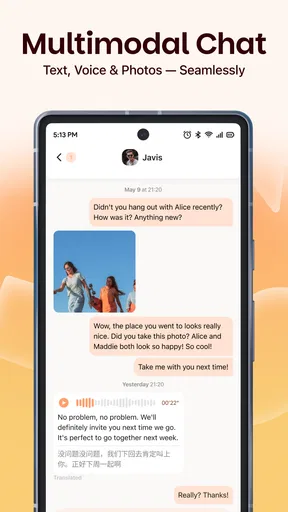
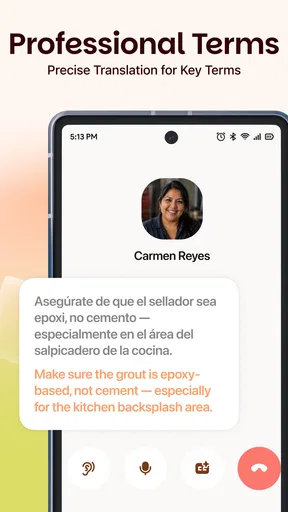

 Analysis by AppCompare
In a shared home, a language gap can show up in small, practical moments: a relative messaging about dinner, a neighbor asking about a delivery, or a visitor trying to explain what they need. I like the idea of having Intent – The Chat Translator available for those conversations because it can help people exchange messages without making one family member the permanent interpreter. It is a communication app from Intent Inc., built around translating text and voice in real time, and that focus makes it most useful when the conversation matters more than polishing a long document.
One conversation, several people involved
A realistic household use is coordinating a visit with someone who is more comfortable writing in another language. I could draft a short message in my own language, check the translated version, and send a clear question about arrival time or what to bring. The other person can respond in the language they know best, reducing the back-and-forth that often happens when everyone tries to use the same limited set of phrases.
That kind of exchange is different from translating a page of text. Short messages depend on context, tone, names, and practical details. I would keep each message focused on one thing: a time, an address, or a specific request. If a translation looks odd, rewriting the source sentence in simpler words is usually a better move than sending a complicated sentence and hoping the app interprets it as intended.
Set expectations before sharing a device
Intent can be useful in a household, but I would treat a shared phone as a shared workspace rather than assume every conversation is automatically separate. Before handing a device to someone else, I would check whose account is open and whether the next person is comfortable using that session. That simple pause helps avoid sending a personal message from the wrong profile or leaving a conversation visible to someone who did not take part in it.
I would also agree on a simple routine: each person handles their own conversations when possible, and anyone helping with translation reads only what is needed for the task. That is especially worthwhile when a message includes private matters such as health, money, or travel arrangements. Translation can make communication easier, but it does not remove the need for ordinary boundaries between people using the same screen.
Coordination without becoming the family translator
The strongest household benefit is not that the app solves every language problem; it is that it can make small coordination jobs less dependent on one bilingual relative. A parent, partner, or older child can prepare a short message, review it, and take responsibility for sending it. I would still step in when a conversation becomes emotionally sensitive or involves an important decision, but routine questions need not always pass through the same person.
Voice translation can be helpful when typing is awkward, such as when someone is carrying bags or trying to explain something quickly. For a noisy room, an unfamiliar name, or a precise instruction, I would switch back to text and check the wording before it goes out. That is a practical trade-off: speaking can be convenient, while typed messages give the sender more time to inspect the sentence and correct the meaning.
Worth Reading Before You Choose

Flipboard Shows What News Apps Must Do Beyond the Feed

Switching to Android Auto Means Rethinking Your Driving Routine

Google Calendar Makes a Crowded Week Easier to Manage

Ludo King Makes the Most of the Minutes Between Plans

Baby Panda World Brings Quick Play to Modern Phones, but Its Game Library Feels Busy

ESPN’s Live Game View Makes Following Close Games Easier
Age, trust, and sensible limits
The app is free and has a Teen content rating, which gives households a useful starting point when deciding whether it fits a younger user. That rating is not a substitute for a family conversation about who a teen is messaging, what personal information they should share, and when to ask an adult for help. I would frame Intent as a language aid, not as a way to make every online interaction trustworthy.
For a message involving a medical symptom, payment, legal matter, or a change to travel plans, I would use the translation to understand the exchange but confirm critical details directly. A fluent-looking sentence can still miss a cultural nuance or a key distinction. If the stakes are high, a qualified human interpreter or a trusted bilingual person is the safer choice.
Breaking Down Language Barriers
So, here’s the lowdown on Intent – The Chat Translator. It’s designed to make chatting in different languages as seamless as chatting with your next-door neighbor. The app offers real-time translations, which means you can have a conversation with someone in, say, Mandarin, even if your Mandarin skills are limited to just saying ‘ni hao’.
One of the coolest features is its ability to integrate with popular messaging platforms. Whether you’re on WhatsApp, Messenger, or even good old SMS, Intent’s got your back. You just type your message in your native language, and voilà, it’s translated into the language of your choice. Pretty neat, huh?
User-Friendly Interface
Let’s talk about the interface for a sec. It’s sleek, intuitive, and easy on the eyes. No need to be a tech whiz to navigate through this app. From the moment you open it, you’re greeted with a friendly design that guides you through the setup process. Setting up your preferred languages is a breeze, and you can switch between them effortlessly depending on who you’re chatting with.
Another thing I love is how the app doesn’t bombard you with ads. We all know how annoying that can be, right? Instead, it focuses on delivering a smooth user experience, allowing you to concentrate on your conversations without interruptions.
Accuracy and Speed
Now, let’s get to the nitty-gritty—accuracy and speed. These are crucial when it comes to translations, especially in real-time conversations. I’ve tested it out in a few different languages, and I’ve been pretty impressed. The translations are not just quick but also surprisingly accurate. Of course, no app is perfect, but Intent does a solid job of capturing the essence of the conversation.
There’s also a nifty feature where you can review the translations before sending them. This is a lifesaver if you want to make sure everything sounds just right before hitting that send button. It’s like having a second pair of eyes to catch those pesky autocorrect errors.
Privacy and Security
In today’s digital age, privacy is a big deal. So, you might be wondering, is this app safe? From my experience, Intent takes user privacy seriously. The app ensures that your conversations are encrypted, meaning your chats remain private and secure. You can chat away without worrying about prying eyes.
Plus, the team behind Intent is pretty transparent about their data policies, which is always reassuring. You know exactly what data is being collected and how it’s being used, which is a big plus in my book.
Workflows, versions, and practical trade-offs
One useful habit is to separate drafting from sending. I would first write the whole thought in plain language, then review the translated result before sharing it. For a household arrangement, that means checking not just the main point but small details such as whether a question sounds like a request, whether a time is clear, and whether a name has been carried over correctly. Translation tools are most helpful when the person sending the message still takes responsibility for its meaning.
Intent’s current version is 0.4.4.1, so I would approach it as a developing tool rather than assume every part of a messaging workflow will behave exactly like a mature keyboard or a built-in translation service. The app is free, which makes it easy to try for occasional conversations, but “free” does not mean it is automatically the best fit for every communication habit. If someone only needs a quick translation once in a while, a phone’s built-in tools or a general-purpose translator may involve less setup. If the aim is to keep a two-way chat moving across languages, a dedicated chat translator is the more natural place to start.
When another option makes more sense
I would not choose a chat translator as the only tool for formal or high-consequence writing. A work contract, a school consent note, or instructions about medication deserve careful human review, because a smooth sentence can still carry the wrong shade of meaning. Likewise, someone who mainly needs to translate signs, menus, or long documents may be better served by a tool designed around camera or document translation rather than messaging.
For casual coordination, the balance is different. A quick exchange about groceries or a pickup can tolerate a little extra checking, and the chance to review a message before it is sent is valuable. I would also avoid treating translated text as a perfect record of the other person’s tone. If a reply sounds unusually blunt or confusing, I would ask a simple follow-up instead of reacting to the wording alone.
Who is likely to get the most from it?
Intent makes the most sense for people who regularly message across language differences: households with multilingual relatives, travelers keeping in touch with local contacts, or anyone building a friendship where both people are more comfortable in different languages. Its appeal is less obvious for someone who rarely encounters that situation or wants a full language-learning course. It helps conversations happen; it is not a replacement for learning vocabulary, grammar, or cultural context.
There are practical questions I would settle before relying on it every day. Can each person comfortably use the same device, or would separate phones make more sense? Is the conversation casual enough for machine translation, or does a misunderstanding carry real consequences? Does the recipient know that translation is involved and feel comfortable with that? Answering those questions early makes the app easier to use well and prevents convenience from turning into confusion.
Household verdict
Intent has a 4.3 average from around 1,100 ratings, and it has passed 1 million installs. Those figures suggest that it has found an audience, but I would judge it by whether it makes a particular conversation easier. The app is rated for teens and works best, in my view, when people use it openly, keep messages clear, and check important details rather than trusting a translation blindly.
Its main strength is the role it can play between ordinary messaging and translation: it helps people keep a conversation moving without asking one family member to interpret every line. Its main limitation is the same one shared by any automated translation tool: speed cannot guarantee nuance. For everyday household coordination, that is a worthwhile trade when everyone understands the boundaries. For sensitive decisions or exact wording, I would bring in a human who knows both the language and the situation.
Wrapping It Up
All in all, Intent – The Chat Translator is a fantastic tool for anyone looking to break down language barriers. Whether you’re traveling, making new friends worldwide, or conducting business, this app is a must-have in your digital arsenal. It’s user-friendly, efficient, and most importantly, it gets the job done.
So, if you’re ready to connect with the world and have some fun while doing it, give Intent a shot. You might just find yourself having conversations you never thought possible, all thanks to this nifty little app. Happy chatting!
Pros
- Seamless real-time translation.
- Supports multiple languages.
- User-friendly interface.
- Integrates with popular chat apps.
- Fast and reliable performance.
Cons
- Limited offline functionality.
- Occasional minor translation errors.
- Requires stable internet connection.
- Subscription needed for full features.
- May not support all dialects.
FAQs for Intent – The Chat translator
What is Intent – The Chat Translator, and how does it work?
Intent – The Chat Translator is an innovative app designed to translate messages in real time during chat conversations. It supports multiple languages, allowing seamless communication between users who speak different languages. The app integrates with popular messaging platforms and utilizes advanced machine learning algorithms to ensure accurate and context-aware translations.
Is Intent – The Chat Translator compatible with all messaging apps?
Intent – The Chat Translator is compatible with most major messaging platforms, including WhatsApp, Messenger, and Telegram. However, it may not support every app due to varying platform restrictions. It's advisable to check the app's compatibility list on the developer's website or in the app store description to ensure it meets your needs.
Does Intent – The Chat Translator require an internet connection to function?
Yes, Intent – The Chat Translator requires an active internet connection to perform translations. This is because the app relies on cloud-based services to access its translation algorithms and language databases. Make sure you have a stable connection to ensure smooth and uninterrupted translations during your conversations.
How secure is my data with Intent – The Chat Translator?
Intent – The Chat Translator takes user privacy and data security seriously. The app employs encryption protocols to protect messages during translation. However, as with any app that handles sensitive data, users should review the privacy policy and terms of service to understand how their data is used and stored.
Are there any subscription fees or in-app purchases in Intent – The Chat Translator?
Intent – The Chat Translator offers a free version with basic features, but advanced features may require a subscription or in-app purchases. These might include premium language packs, ad-free experiences, or enhanced translation capabilities. Users can review the pricing options within the app or in the app store listing to decide what best suits their needs.


